
Overview
Karen Unicode · Myanmar digits & punctuationKeyboard mapping
Normal · lower left Shift · upper right QWERTY Dotted circles: Not typed Dash: No output
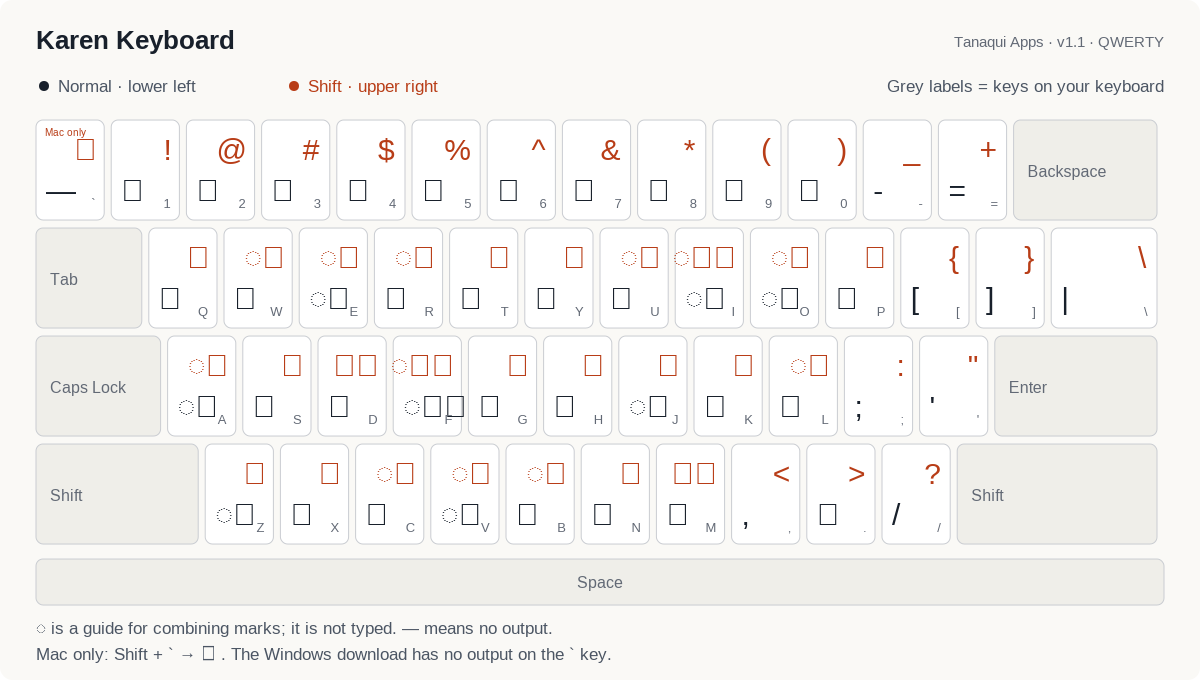
၍—
!၁1
@၂2
#၃3
$၄4
%၅5
^၆6
&၇7
*၈8
(၉9
)၀0
_-
+=
Backspace
Tab
ႁၦQ
◌ွဝW
◌ံ◌ဲE
◌ြရR
ထတT
ၰယY
◌းဧU
◌ၢ်◌ၢI
◌ီ◌ိO
ပဖP
{[
}]
\|
Caps Lock
◌့◌ါA
ဆစS
ဒ်ဒD
◌ၣ်◌ာ်F
ဂငG
သဟH
ၯ◌ၠJ
ခကK
◌ျလL
:;
"'
Enter
Shift
ၡ◌ှZ
၊အX
◌်ဃC
◌ူ◌ုV
◌ၤဘB
ညနN
မ်မM
<,
>။
?/
Shift
Space
Install on Mac
- Download and unzip karen-keyboard-layout-mac.zip.
- Open Karen Keyboard Layout by Tanaqui Apps.bundle. macOS opens Keyboard settings automatically.
- Click Add Input Source, then Done.
- Switch layouts from the menu bar input menu, or press Control + Space to cycle input sources.
Remove the layout
Open System Settings → Keyboard → Input Sources, select Karen by Tanaqui Apps, and click the minus button.
Install on Windows
- Download and unzip karen-keyboard-layout-windows.zip.
- Open the karenfkb folder. Right-click install.ps1 and choose Run with PowerShell (approve the administrator prompt). Or double-click install.bat and approve the admin prompt.
- Sign out and back in, or restart your PC.
- Open Settings → Time & language → Language & region, add a keyboard, and choose Karen by Tanaqui Apps.
If PowerShell blocks the script
Run these commands once in an administrator PowerShell window:
Set-ExecutionPolicy -Scope Process Bypass
cd path\to\karenfkb
.\install.ps1
Manual install (advanced)
Copy the KarenFKB.dll file for your architecture (i386, amd64, or wow64) into C:\Windows\System32, then run:
.\install.ps1 -RegisterOnlyTroubleshooting
- Layout not listed on Windows — confirm you ran the installer as administrator, then sign out and back in before adding the keyboard.
- PowerShell execution policy — use the bypass commands above, or run install.bat instead.
- Wrong architecture on Windows — the installer picks the correct DLL for your system (32-bit, 64-bit, or ARM64 via wow64).
- Mac bundle will not open — unzip the download first; do not run the zip directly. The bundle must be extracted before double-clicking.
Layout notes
- J + Shift outputs ၯ; Y + Shift outputs ၰ on both Mac and Windows.
- On Mac, ` + Shift outputs the Myanmar character ၍. The Windows download has no output on the ` key, with or without Shift.
Each zip also includes a README.txt with the same instructions. For questions about custom digital work or other Tanaqui Apps tools, visit Start a Project.